Why your viewer count is stuck (and how to fix it)
You set up your phone, fix your lighting, hit go live and… the counter says 0. Then 1. Then back to 0. Every creator has been there.
The good news: learning how to get more viewers on live stream is a skill, not luck. Viewers find streams that are easy to discover, stay for streams that feel like a conversation, and come back to creators who show up on time.
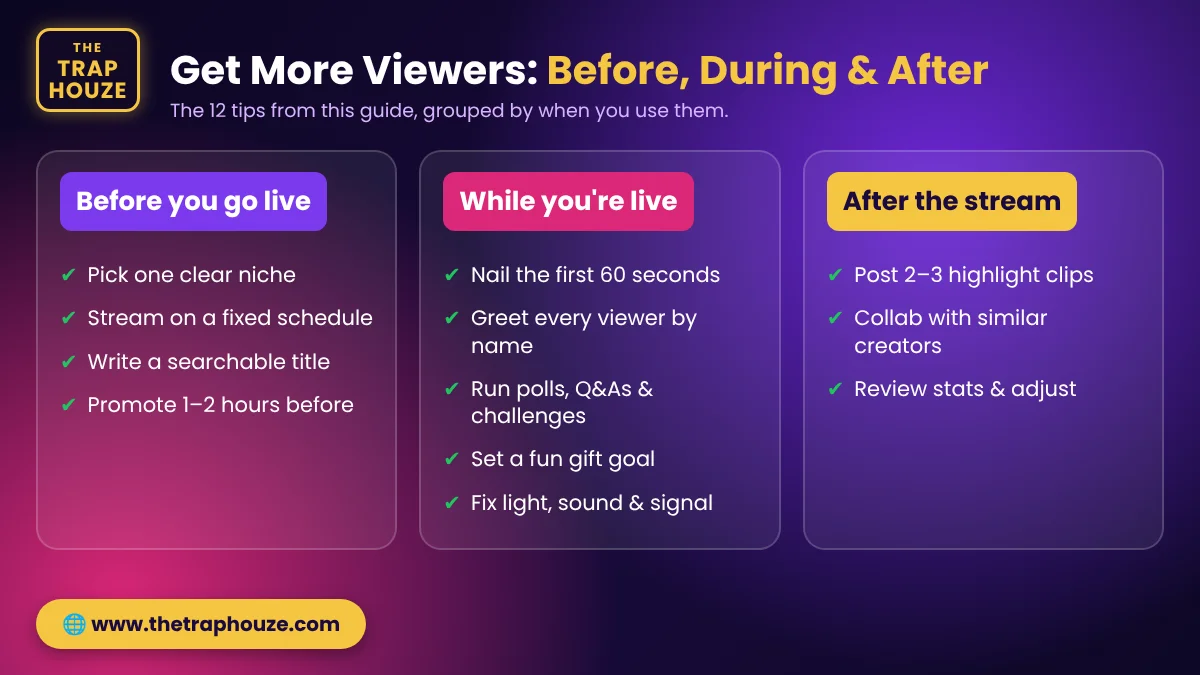
This guide gives you 12 proven tips grouped into three stages: before you go live, while you’re live and after the stream. Each one is simple enough to try on your next broadcast. Still setting up? Read how to start live streaming on your phone first, then come back here to grow.
Why most live streams get zero viewers
Low viewer counts rarely mean your content is bad. They usually come from three fixable problems:
- Nobody knows you’re live. No schedule, no promotion, no clear title.
- New viewers leave in the first minute. A slow, silent start gives them no reason to stay.
- Viewers don’t come back. There’s no reminder of when the next stream is or why it’s worth watching.
Fix those three and your numbers start to move. That’s what the growth loop below is built to do.
The live stream viewer growth loop
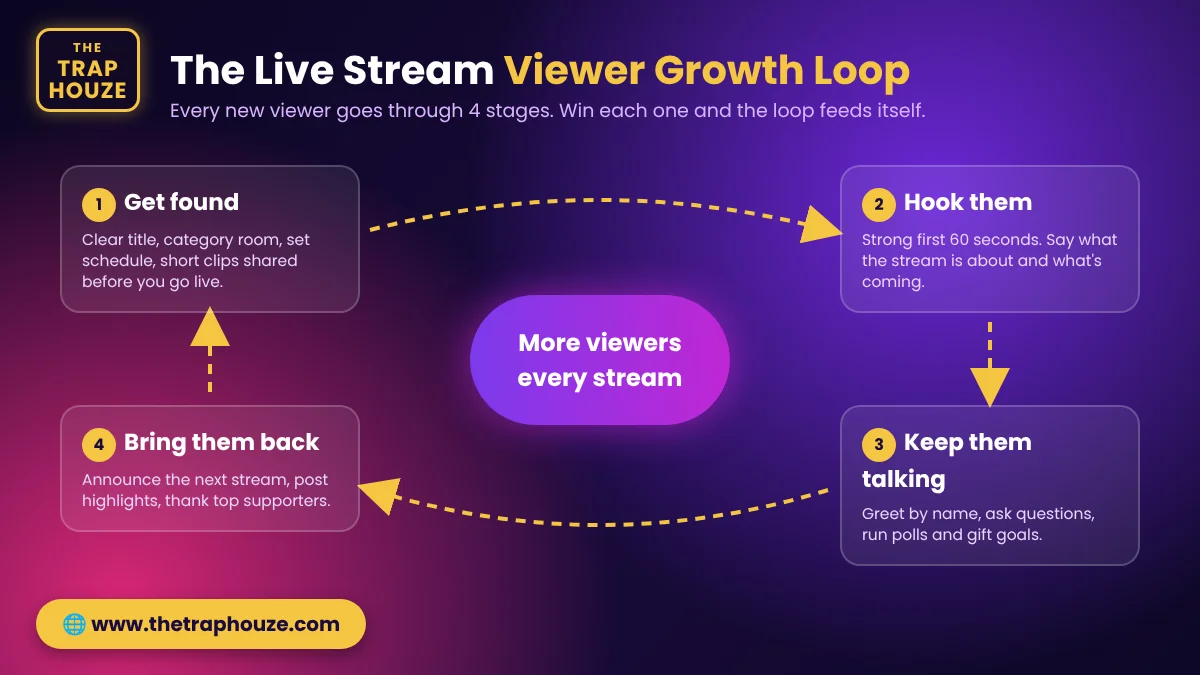
Every new viewer moves through four stages: they find your stream, get hooked in the first minute, engage with you in chat, and come back next time. Win each stage and the loop feeds itself, because returning viewers bring new ones with them.
Before you go live: 4 tips to get found
1. Pick one clear niche
“I stream everything” is hard to recommend. “Late-night acoustic covers” or “Sunday cooking with fans” is easy. A clear niche tells viewers what to expect and helps the app place you in the right category room. You can widen your topics once you have a loyal core.
2. Stream on a fixed schedule
Consistency is the most underrated growth tactic. When fans know you’re live every Tuesday and Friday at 9 PM, they plan around it. Start with 2–3 streams a week at the same time and keep each one at least 45–60 minutes, so people who join late still catch you.
3. Write a title people would search for
Your title is your shop sign. Say what happens and add a hook: “Taking song requests 🎸 Bollywood + Pop | Day 12” beats “Chill stream.” Put the main topic first, keep it short, and pick the right category so the live-now feed shows you to the right crowd.
4. Promote your stream 1–2 hours before
Post a short teaser on your Instagram Stories, WhatsApp channel or other socials 1–2 hours before you go live, then a “live now” post when you start. Share what’s special about today’s stream, a guest, a challenge or a giveaway, so people have a reason to show up.
While you’re live: 5 tips to keep viewers watching
5. Nail the first 60 seconds
Most new viewers decide in under a minute whether to stay. Don’t wait for “more people to join.” Start with energy, say what the stream is about and tease what’s coming: “In 20 minutes we’re doing a fan-pick challenge, stick around.”
6. Greet every viewer by name
A live stream is a conversation, not a broadcast. When someone joins, say hi using their username. When they comment, reply out loud. People stay where they feel seen, and a viewer who gets a shout-out is far more likely to follow.
7. Run polls, Q&As and challenges
Give viewers something to do. Ask them to vote on the next song, game or recipe. Run a 10-minute Q&A. Set mini challenges like “Type 1 if you’re watching from India.” Active chat also signals to the app that your stream is worth recommending.
8. Set a fun gift goal
A visible goal turns watching into a shared mission: “When we hit 500 coins, I’ll sing your request.” Keep it playful, thank every supporter by name and never pressure anyone. Want to understand how gifts work first? Read what live streaming gifts are and how they work.
9. Fix your light, sound and signal
Viewers forgive a simple setup but not bad audio or a frozen stream. Face a window or a ring light, use a clip-on mic if you can, and test your connection on mobile data before going live. Our beginner’s phone streaming setup guide covers the basics.
After the stream: 3 tips to bring viewers back
10. Post 2–3 highlight clips
Your best 15–30 second moments, a funny reaction, a great song or a big gift moment, are free ads for your next stream. Post them on Reels, Shorts and Stories with the line “Live again Friday 9 PM.”
11. Collab with similar creators
Co-streams and shout-outs put you in front of an audience that already likes your kind of content. Look for creators in your niche with a similar viewer count, so the swap feels fair to both sides.
12. Review your stats and adjust
After each stream, note three numbers: peak viewers, average watch time and new followers. Compare time slots, titles and stream formats over 3–4 weeks. Do more of what works and drop what doesn’t.
Which tips get results fastest?
Not every tip pays off at the same speed. If you only have time for a few this week, start with the quick wins.
| Tip | Effort | When you’ll see results | Best for |
|---|---|---|---|
| Nail the first 60 seconds | Low | Next stream | Keeping new viewers |
| Greet viewers by name | Low | Next stream | Followers and loyalty |
| Write a searchable title | Low | Next stream | Getting found |
| Promote 1–2 hours before | Low | Next stream | Getting found |
| Polls, Q&As and challenges | Medium | 1–2 weeks | Chat activity |
| Gift goals | Medium | 1–2 weeks | Engagement and support |
| Fixed schedule | Medium | 2–4 weeks | Returning viewers |
| Highlight clips | Medium | 2–4 weeks | New audiences |
| Collabs | High | 2–4 weeks | New audiences |
| Review stats | Low | 4+ weeks | Long-term growth |
Sample weekly streaming plan for new creators
Use this as a starting template and adjust the days to when your audience is free.
| Day | Task | Time needed |
|---|---|---|
| Monday | Post 2 highlight clips from last stream | 30 min |
| Tuesday | Live stream #1 (promote 1 hour before) | 60–90 min |
| Wednesday | Reply to comments, plan Friday’s challenge | 20 min |
| Thursday | Reach out to one creator for a collab | 15 min |
| Friday | Live stream #2 with poll or gift goal | 60–90 min |
| Sunday | Review stats, set next week’s titles | 20 min |
Mistakes that keep your viewer count low
- Streaming at random times. Fans can’t build a habit around you.
- Waiting in silence for viewers. Talk from second one, even to an empty room. Replays and late joiners notice.
- Ignoring chat. Reading comments without replying makes viewers feel invisible.
- Begging for gifts or follows. It pushes new viewers away. Earn support with great moments instead.
- Quitting after two weeks. Most creators see real growth only after 4–8 weeks of steady streaming.
Grow your audience on Traphouze
Traphouze is a social live streaming platform built to help new creators get seen. You can go live in one tap in HD, chat with fans in real time and get discovered in category rooms for music, gaming, entertainment and lifestyle. Viewers can send virtual gifts during your stream, and built-in moderation keeps your space friendly.
As a newer platform, Traphouze gives early creators a real chance to build a loyal fan base before the space gets crowded. See what the app offers on our live streaming app for creators page.
Ready to grow? Traphouze is launching soon on iOS and Android. Join the waitlist and be one of the first creators to go live.
Frequently asked questions
1. How do I get more viewers on my live stream?
Stream on a fixed schedule, use a clear and searchable title, promote your stream 1–2 hours before, start with energy in the first minute and talk to every viewer by name. After the stream, post short highlight clips to bring new people to your next one.
2. How do I get viewers on a live stream with 0 followers?
Start with a narrow niche, pick the right category room and stream at the same time each week. Share clips on your other socials, collab with creators of a similar size and treat every single viewer as a regular. Small streams grow fastest through personal connection.
3. What is the best time to go live?
There’s no single best time. Evenings and weekends work for many audiences, but the right slot depends on where your fans live and when they’re free. Test 2–3 time slots for a few weeks, then stick with the one that brings the most viewers.
4. How long should a live stream be to grow an audience?
Aim for at least 45–60 minutes. Longer streams give more people a chance to find you and give the app more time to recommend you. Quality matters more than length, so end before your energy drops.
5. Does engaging with chat really help a live stream grow?
Yes. Replying to comments, running polls and giving shout-outs keeps viewers watching longer and makes them more likely to follow and return. On many apps, active chat also helps your stream get recommended to more people.